

Medical device quality management becomes more demanding as a company grows.
Controlled documents, forms, approvals, and training provide the foundation. As quality events become connected with CAPA, risk, suppliers, changes, and technical documentation, teams need workflows that keep those connections visible.
They need to show what happened, who was responsible, what was reviewed, and what evidence supports each decision.
That is the role of qmsWrapper Lifecycle, Level 2 of the qmsWrapper platform.
Lifecycle connects quality events with the records and activities needed to investigate them, take action, and demonstrate the outcome. A reported problem can lead to a risk review, supplier investigation, CAPA, revised SOP, or additional training. Those activities remain connected so the team can follow the event through to evidence that the actions worked.
Release 10.4 strengthens these connections with controlled event workflows, more complete risk assessments, approvable traceability, and clearer supplier and change management. It also introduces improvements across the wider qmsWrapper platform.
Quality events become controlled workflows
A quality event can begin with a complaint, an unexpected test result, a supplier issue, or something observed during an audit.
The initial report is only the beginning. The team needs to assess the problem, decide who owns it, investigate the cause, and check whether the resulting actions were effective.
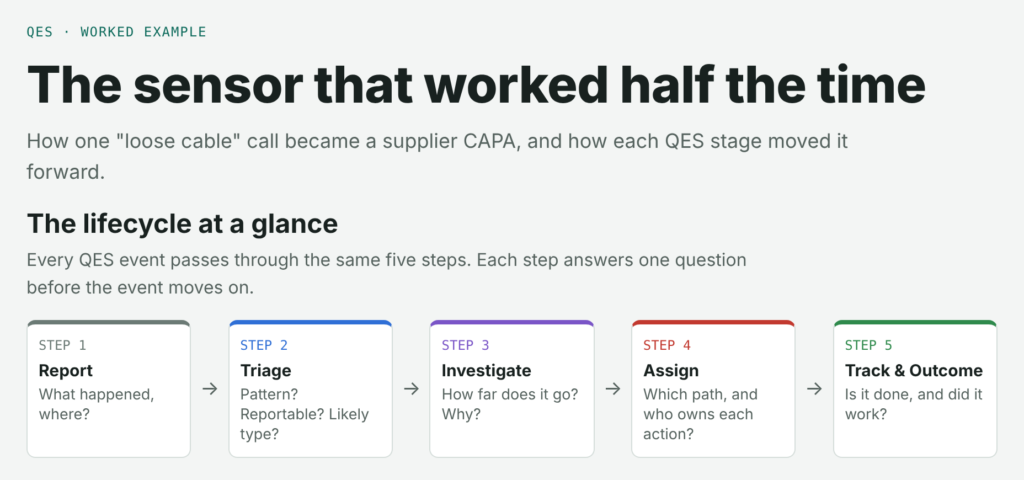
In qmsWrapper 10.4, a QES event moves through five connected steps:
- Report: capture what happened, where it happened, and what was tried.
- Triage: identify patterns, assess reportability, and determine the likely event type.
- Investigate: assess the scope and risk, investigate the cause, and document the findings.
- Assign: confirm the event path and assign responsibility for the required actions.
- Track & Outcome: follow actions through completion and review whether they were effective.
Each stage can be formally reviewed and electronically signed before the event progresses.
The event record brings together affected objects, applicable requirements, and assigned responsibilities. Submitted reports are preserved, while later additions and revisions remain identifiable.
The redesigned Event Log gives teams a clearer view of progress, from the first report through investigation, assigned work, review, and outcome.
See how one reported problem becomes a connected investigation
A sensor works intermittently. The first explanation is a loose cable, but further reports suggest a wider problem.
Our worked example follows the event through each stage, showing how the investigation develops into a supplier CAPA, updated procedures, and training.
Follow the full QES event example to see what is recorded, decided, and reviewed at each stage.
The example continues into PSUR preparation, showing how records captured throughout the QES lifecycle can support periodic safety reporting.
Risk management covers the complete assessment
Individual risk decisions need to remain connected to the overall assessment.
Release 10.4 adds more structure around the risk management process, including:
- a dedicated benefit-risk decision point
- classification of risk control measures by their strength
- clearer documentation of control implementation and verification
- a closing review of the overall risk assessment
- management review and approval of the complete assessment
- the ability to initiate a risk directly from an identified hazard
These improvements help teams maintain evidence of how risks were evaluated, controlled, verified, and reviewed as part of the wider assessment.
Traceability becomes formal, approvable evidence
Traceability connects requirements, risks, development activities, verification, validation, and supporting evidence.
In qmsWrapper 10.4, a complete Traceability Matrix can be submitted for approval, creating a frozen, signed snapshot of the approved version.
Matrices can be generated from approved process automations, and their columns can be modified after creation. A dedicated Risk Log provides visibility into linked hazards and assessment results, while improved exports make the evidence easier to review and share.
This helps teams maintain a clearer connection between product requirements, risk, development, and the evidence supporting their Technical File.
Supplier quality and changes stay connected to follow-up
Supplier qualification and change management both involve decisions that need supporting records and continued follow-up.
The new Supplier Register provides a centralized view of suppliers, including qualification information, risk, status, and recertification dates.
A public supplier portal allows external suppliers to complete and electronically sign qualification forms without requiring a qmsWrapper user account.
Change Management now has a dedicated log, giving teams clearer visibility into change records, phases, assigned activities, linked documentation, and related quality records.
These improvements make it easier to follow supplier and change activities and keep their evidence connected.
AI supports the work while people remain responsible
Release 10.4 expands AI-supported work while keeping human review and permissions central.
Contextual AI assistance has been improved, and a new AI usage view provides greater visibility into where AI credit is being used. AI-assisted values and decisions can be reflected in the record and audit trail, helping teams preserve evidence of human review.
The updated Wrapper MCP integration allows compatible AI applications, including ChatGPT and Claude, to connect to qmsWrapper through permission-controlled access.
Depending on the permissions granted, connected applications can work with supported tasks, forms, documents, files, training information, and related records.
AI assists. Humans approve. qmsWrapper preserves the evidence.
Improvements across the qmsWrapper platform
Alongside the Lifecycle developments, release 10.4 introduces improvements to training, QMS documentation, everyday work, and document control.
Training with version-controlled evidence
Training plans now support controlled Current and Next versions, making it easier to distinguish an approved plan from its upcoming revision.
Different training activities can require different completion evidence, including document acknowledgement, assessment results, and uploaded files.
The Training Matrix can assign approved training plans to groups and preview how changes will affect employees’ training obligations.
This gives teams clearer evidence of what training was required, which revision was reviewed, and how completion was demonstrated.
A more flexible QMS Manual
Organizations can configure the QMS Manual’s sections, fields, applicability, and scope to reflect their own quality management system.
New capabilities include section rearrangement, revision comparison, named views, approval status tracking, and PDF export.
The same controlled QMS information can therefore be presented for different standards, scopes, or reviews.
Capture work first, organize it next
Tasks and forms can now be created without immediately assigning them to a project.
A new Sort Log helps responsible users identify records that still need assignment or classification. The + Start launcher brings task creation, event reporting, forms, processes, and other activities together in one place.
Teams can capture work when it happens and organize it through a visible follow-up process.
Stronger electronic signatures and access controls
Records can show the electronic signatures they carry and whether those signatures still apply to the current content.
Additional sign-in and password-policy controls help organizations strengthen access and accountability around controlled QMS records.
Improved document handling with WrapperApp
WrapperApp 2.1.1 introduces browser-based sign-in and improvements to document editing, check-out, and version management.
Users can continue working with familiar desktop applications such as Word and Excel while keeping the corresponding documents controlled in qmsWrapper.
Follow quality events through to evidence
Release 10.4 strengthens qmsWrapper Lifecycle as the operational layer connecting everyday quality activity with product and QMS evidence.
An event can lead to a risk assessment, supplier action, CAPA, document change, or training requirement. Keeping those activities connected helps teams follow what happened, understand the decisions made, and review whether the actions achieved their intended outcome.
The release also includes usability improvements, performance enhancements, security updates, and fixes across the platform.
See how qmsWrapper Lifecycle connects your quality workflows. Book a demo with our team.
Feature availability depends on your organization’s subscription and enabled modules.