
CAPA & Non-Conformance
Driven by events, not assumptions
Every issue starts as a signal. qmsWrapper captures it, decides what it becomes, and enforces what happens next.
CAPA and Non-Conformance are not standalone tools here. They are part of an event-driven quality system that captures issues early, escalates them only when it makes sense, and (once a CAPA is opened) enforces every step: who investigates, who signs off, and when it is allowed to close.
Not every issue is a CAPA. But every issue must be controlled.
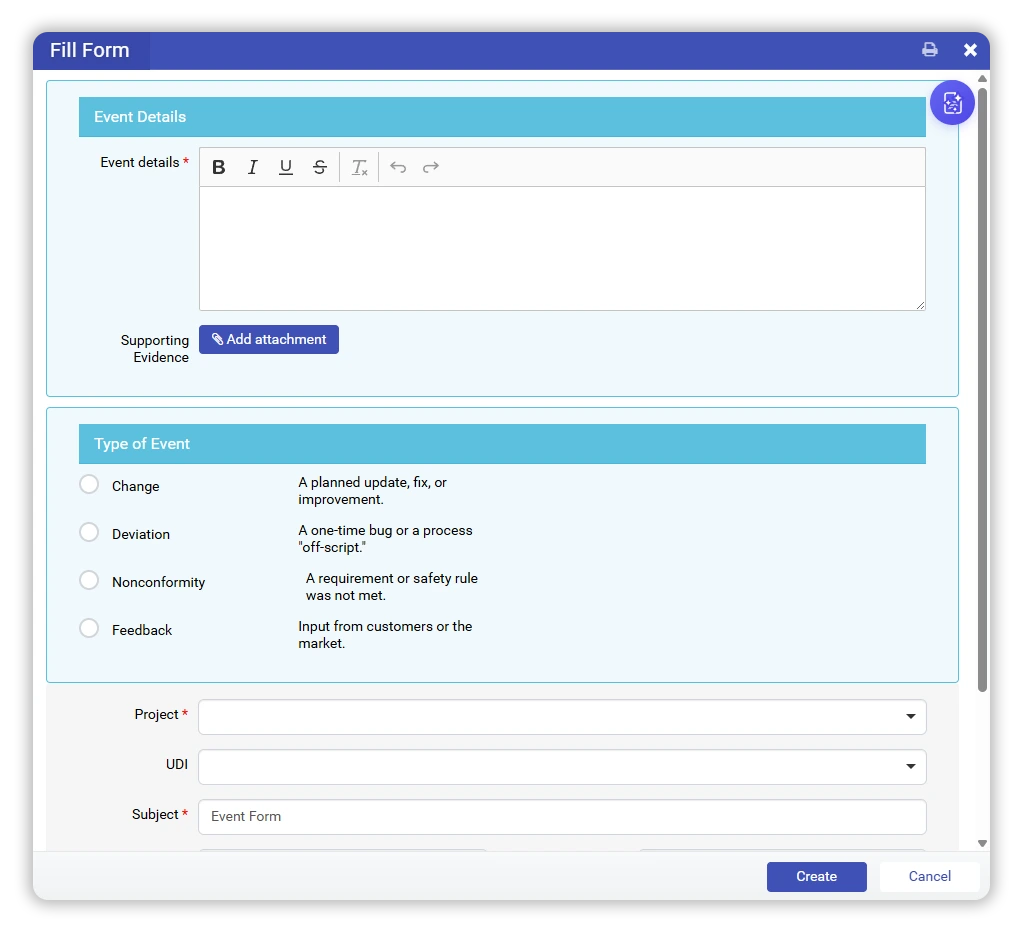
One entry point. No blind spots.
Quality issues do not begin as CAPAs or non-conformities.
They begin as signals noticed during real work: a change, a deviation, a nonconformity, a piece of feedback.
qmsWrapper captures every one of them the same way: as a Quality Event. Logged once, in one place, structured from the start, the moment it is noticed. Nothing informal, nothing stranded on a spreadsheet.
From that point the issue is visible, traceable, and assessable.
If it is not captured as an event,
it is not under control.
Classification before escalation
Once an event is logged, the system supports structured classification, because not everything should become a CAPA.
Some events are corrected and closed. Some are recorded as a Non-Conformance: a core QMS object in its own right, with its own module, not a step on the way to something else. And some justify a CAPA.
Non-Conformance sits beside CAPA, not inside it. A CAPA is a decision you make on top of an event, including on top of a non-conformance, and only when the risk warrants it.
Risk decides, not habit
Escalation continues only when analysis shows a systemic, recurring, or high-risk issue.
qmsWrapper supports risk-based triage so that:
Minor stays minor
Minor issues do not inflate CAPA logs.
Serious gets attention
Serious problems get the attention they deserve.
Proportional
Decisions are proportional and defensible.
For QMS managers, that means fewer CAPAs, and stronger ones.
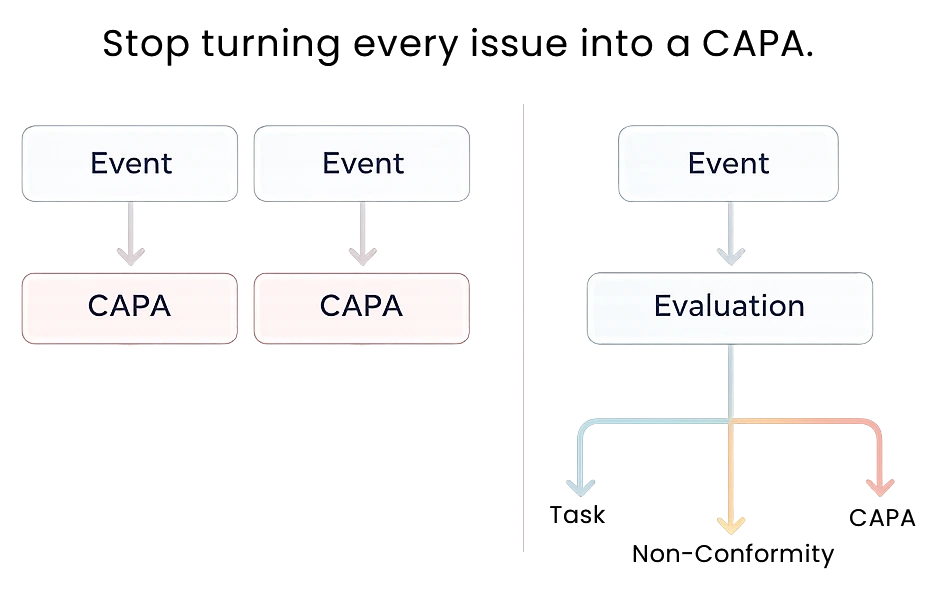
CAPA is not a starting point.
It is a decision.
Two Depths of CAPA
A CAPA reaches qmsWrapper two ways. It can come out of the triage above, a quality event serious enough to act on. Or you can log one directly, the moment you know you need it, without a quality event at all. Either way, it runs at one of two depths.
Level 1 · CAPA Log
Form-driven, and light by design. Any form you designate as a CAPA-type form lands in the Log: visible, searchable, and linked from the moment it is created. Build your own CAPA form, or start from the general one we provide. No stages, no enforcement. The Log tracks forms; it needs no quality event to start.
Level 2 · CAPA Lifecycle
Event-driven, and fully enforced. When an issue needs the complete corrective-action process, it enters the Lifecycle: eight ordered stages the system will not let you shortcut. One CAPA form underlies the whole process, surfaced as five typed variants (supplier, feedback, deviation, non-conformance, general) so each opens with the right context.
A CAPA can start in the Log today and move into the enforced Lifecycle the moment it needs to, with its full history intact.
An 8-Stage Lifecycle, Not a Label
Once a CAPA enters the enforced lifecycle, it moves through eight ordered stages, and the system does not allow shortcuts:
1
Open
2
Triage
3
Investigation
4
Root Cause Identified
5
Action Plan Approved
6
Implementation
7
Effectiveness
8
Closed
Each transition is checked against what has actually been completed. A CAPA cannot jump from Investigation to Closed, and cannot be advanced by editing a status field. Every stage change is written to an audit trail with who made it, when, and why (a reopened CAPA requires a documented reason).
Built-in Controls
Independent QA Sign-off
Two points in the lifecycle require sign-off from a QMS manager who is not the CAPA’s own author: after root cause analysis, and again before closure.
The approver pool excludes the CAPA’s own author automatically. Segregation of duties (ISO 13485 §8.5.2) is enforced by the system, not manual discipline.
Nothing Closes Early
A CAPA flagged for regulatory reporting cannot reach Effectiveness until a linked vigilance task exists. The system blocks it rather than relying on memory.
Closure works the same way: an open linked Change Request or vigilance task holds the CAPA open until it is resolved.
Clear oversight, audit-ready by design
Non-Conformances and CAPAs each have their own dedicated modules, with clean logs designed for everyday QMS management.

A stage-aware AI assistant sits inside the CAPA record itself. It reads the CAPA’s event description and current stage, then offers:
- a classification and root cause method to consider
- draft action plan and effectiveness language
- new suggestions every time the CAPA advances to its next stage
The assistant drafts. It does not decide. Nothing is saved to the record until you advance the stage, so an abandoned suggestion never reaches the audit trail.
Auditors see not just what happened, but why each decision was made, and by whom.
What the Dashboard Shows
One view gives QMS managers five things at a glance:
By stage
How many CAPAs sit in each stage.
Overdue
Which ones have been open more than 90 days.
Reopen rate
What percentage of closed CAPAs get reopened.
Effectiveness
How many checks pass, fail, or are still pending.
Time in stage
Average time spent in each stage.
It is the same data an auditor asks for. It is already assembled.
See it in an event-driven system
Your QMS should not turn every issue into a CAPA,
and it should not lose control of the ones that are not.
We will show you how events, non-conformances, and CAPAs work together in one coherent system.
How it maps to the regulations
A CAPA can originate from a non-conformance, a customer complaint, an internal audit finding, post-market surveillance, or a management review. Each carries the same enforced Lifecycle once opened.
CAPA is one of the most inspected areas of any medical device QMS. qmsWrapper’s CAPA and non-conformance workflow maps to:
- ISO 13485:2016 §8.5.2 (corrective action) and §8.5.3 (preventive action).
- FDA 21 CFR 820.100, including all eight CAPA sub-elements.
- MDR Article 83 (post-market surveillance plan) and Annex III §1.1(c) (post-market corrective actions).
- ISO 13485 §8.2.4 (monitoring and measurement) and MDSAP Chapter 4.
- EU AI Act Article 9 when a CAPA is triggered by AI model drift.