
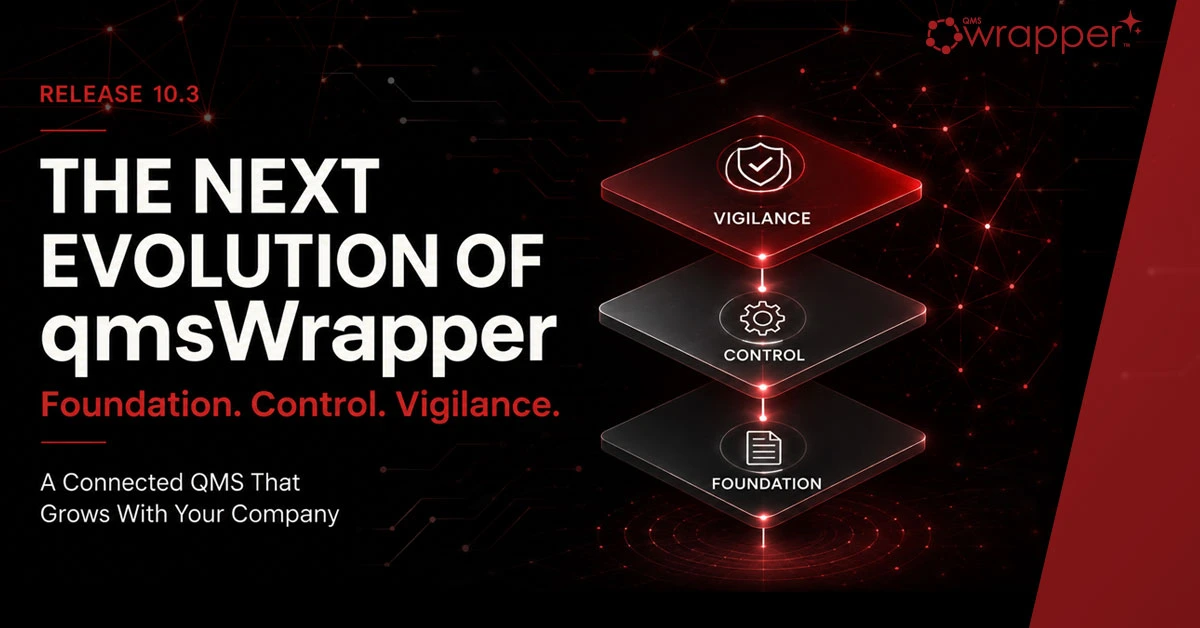

A connected QMS platform that grows with your company
Medical-device companies do not all need the same QMS on day one.
Some teams are still moving from paper forms, Word templates and spreadsheet logs into controlled records. Others are managing CAPA, change control, risk, training, suppliers and technical documentation. More mature organizations need continuous visibility across PMS, vigilance, audit evidence, regulatory readiness, FDA QMSR, EU MDR and EUDAMED-related obligations.
qmsWrapper 10.3 is built around that reality.
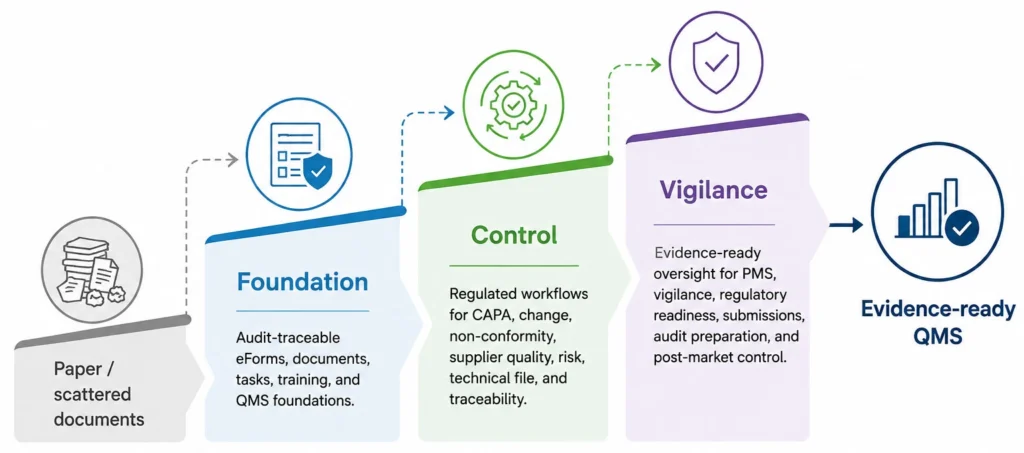
This release introduces a new three-level qmsWrapper platform designed to help medical-device, SaMD, IVD and MedTech SMEs implement QMS progressively:
qmsWrapper Foundation — controlled QMS foundations, forms, processes, training, tasks, projects, CAPA Log and EU AI Compliance Log.
qmsWrapper Lifecycle — connected regulated quality workflows, QES, guided CAPA lifecycle, Wrapper Mapper impact analysis, Smart Traceability Matrix and Technical File.
qmsWrapper Vigilance — post-market, vigilance, audit, management and regulatory evidence oversight, planned for release later this summer as it comes out of Beta.
Start with the level you need today. Keep what you build. Expand when ready.
A note for current qmsWrapper users
Current qmsWrapper users will be grandfathered into qmsWrapper Lifecycle for the remainder of their current subscription cycle.
No upgrade will be required to continue using Level 2 / Lifecycle capabilities during the current subscription period.
At renewal, customers can select the qmsWrapper level that best matches their QMS maturity, implementation needs and regulatory evidence burden.
Why the three-level structure matters
A QMS should not force a startup to behave like a large enterprise on day one.
At the same time, the system should not trap a growing company in disconnected forms, spreadsheets and shared folders.
qmsWrapper 10.3 creates a connected path:
Foundation establishes control.
Lifecycle connects quality activity into regulated workflows.
Vigilance extends the system into post-market and regulatory evidence oversight.
Each level builds on the previous one. Documents, forms, processes, tasks, training records, CAPA records and evidence remain part of the same connected system as the company grows.
Nothing needs to be replaced.
Nothing needs to be rebuilt.
The QMS grows with the organization.
qmsWrapper Foundation
The starting point for a controlled QMS
Foundation is designed for companies that need to move from paper, Word, Excel, email and shared folders into a controlled QMS environment.
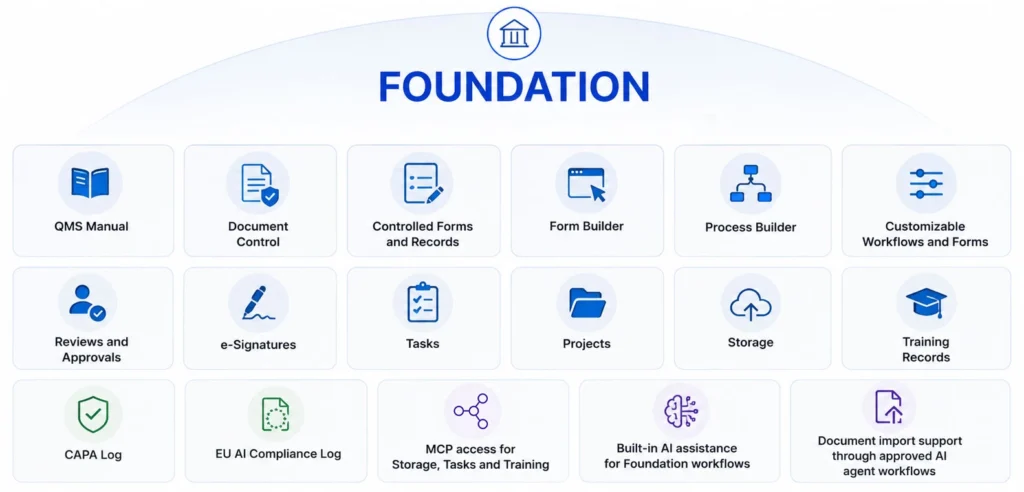
It includes the essential building blocks needed to begin operating a QMS in a structured, traceable and audit-supporting way:
- QMS Manual
- Document Control
- controlled forms and records
- Form Builder
- Process Builder
- customizable workflows and forms
- reviews and approvals
- e-signatures
- tasks
- projects
- storage
- Training Records
- CAPA Log
- EU AI Compliance Log
- MCP access for Storage, Tasks and Training
- built-in AI assistance for Foundation workflows
- document import support through approved AI agent workflows
Foundation is not just a document repository.
It is the first operating layer of the QMS.
It helps teams control what they already have, convert the most important forms and logs into structured records, assign work, manage training, capture CAPA visibility and begin building the evidence trail required for a regulated quality system.
QMS Manual: the foundation of the system
Every QMS needs a clear description of how the company operates.
That is why the QMS Manual is central to Foundation.
The qmsWrapper QMS Manual provides a structured starting point for defining the company-level quality system, linking procedures, connecting forms, assigning responsibilities and aligning the QMS with applicable regulatory frameworks.
The QMS Manual is not treated as a static document sitting outside the system. It is connected to the processes, forms, tasks, training records and controlled documents that make the QMS real.
The QMS Manual can support different regulatory perspectives, including ISO 13485, FDA QMSR, EU MDR or a combined view, helping organizations understand how one quality system supports multiple regulatory expectations.
AI assistance can help users:
- build new manual sections
- refine wording
- connect related processes
- link supporting forms
- identify potential gaps
- map regulatory expectations
The QMS Manual is currently available as a Beta feature and will continue to evolve in upcoming releases.
Training Records: a foundation capability with enterprise value
Training is one of the most basic QMS obligations and one of the most common audit questions:
Who was trained?
On which procedure?
Against which revision?
When was it completed?
Who still needs training?
qmsWrapper 10.3 introduces a redesigned Training Records module as part of Foundation.
The module supports:
- Training Plans
- Curricula
- Training Matrices
- Assignments
- External Persons
- electronic signature verification
- AI-generated Training Findings
When procedures change or responsibilities shift, qmsWrapper can help identify affected personnel and support the creation of required training activities.
Training is no longer managed as a disconnected spreadsheet or administrative afterthought. It becomes part of the QMS itself, linked to documents, processes, tasks and evidence.
For many organizations, the Training module alone addresses a major operational and audit burden. In qmsWrapper Foundation, it is included as part of the starting package.
CAPA Log in Foundation
Startups and growing companies often need a simple, controlled way to capture CAPA activity before they are ready for a full guided CAPA lifecycle.
Foundation includes a CAPA Log to help teams record corrective and preventive actions in a consistent and structured way.
This gives early-stage organizations immediate visibility into CAPA activity without forcing unnecessary process complexity too early.
The CAPA Log helps prevent important quality issues from being lost in emails, meetings, spreadsheets or informal notes.
As the organization matures and requires formal investigation, quality gates, effectiveness verification and closure evidence, CAPA expands naturally into the guided lifecycle available in qmsWrapper Lifecycle.
EU AI Compliance Log
AI is becoming part of regulated work, and organizations will increasingly need to show how AI is used, controlled, disclosed and reviewed.
qmsWrapper 10.3 introduces an EU AI Compliance Log as a Foundation capability.
The EU AI Compliance Log provides a structured place to document AI-related activities, transparency notices, provenance, supporting evidence and governance decisions inside the QMS environment.
This helps organizations prepare for emerging AI transparency and governance expectations, including EU AI Act Article 50 transparency obligations coming into effect from 2 August 2026.
Instead of managing AI governance in spreadsheets or separate policy files, qmsWrapper allows AI-related evidence to sit inside the same controlled QMS environment as the rest of the organization’s quality records.
Foundation includes AI governance capabilities such as:
- AI Activity Log
- AI-assisted record identification
- AI provenance tracking
- Article 50 transparency notices
- controlled AI visibility
- traceable AI-supported activity
AI governance becomes part of the QMS foundation, not a side process.
MCP and built-in AI in Foundation
AI is not bolted on to qmsWrapper.
It is part of the operating model.
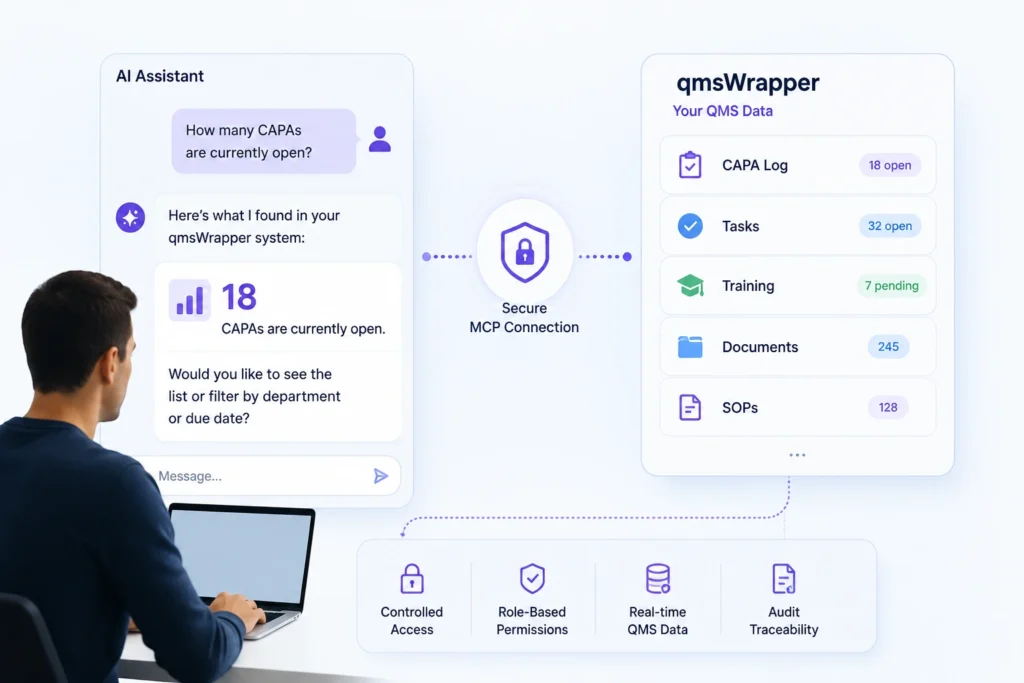
Foundation includes controlled MCP access for approved AI assistants where enabled, supporting areas such as Storage, Tasks and Training.
Approved AI agents can help users import documents, retrieve records, identify tasks, review training information and find relevant QMS evidence using natural language.
For example, users may ask:
- Which SOPs changed last month?
- Who still requires training?
- Which tasks are overdue?
- Show the records related to this process.
- Find documents connected to this training assignment.
MCP access uses controlled authentication and permissions, so AI assistants do not operate outside the QMS boundary.
AI helps search, structure, identify, draft and suggest.
Humans continue to review, approve, sign and release controlled records.
qmsWrapper Lifecycle
From controlled records to connected quality workflows
Foundation helps teams establish control.
Control helps teams connect the QMS.
In qmsWrapper Lifecycle, quality activities are no longer isolated logs, forms or follow-up tasks. They become connected regulated workflows with defined responsibilities, review steps, evidence links and approval controls.
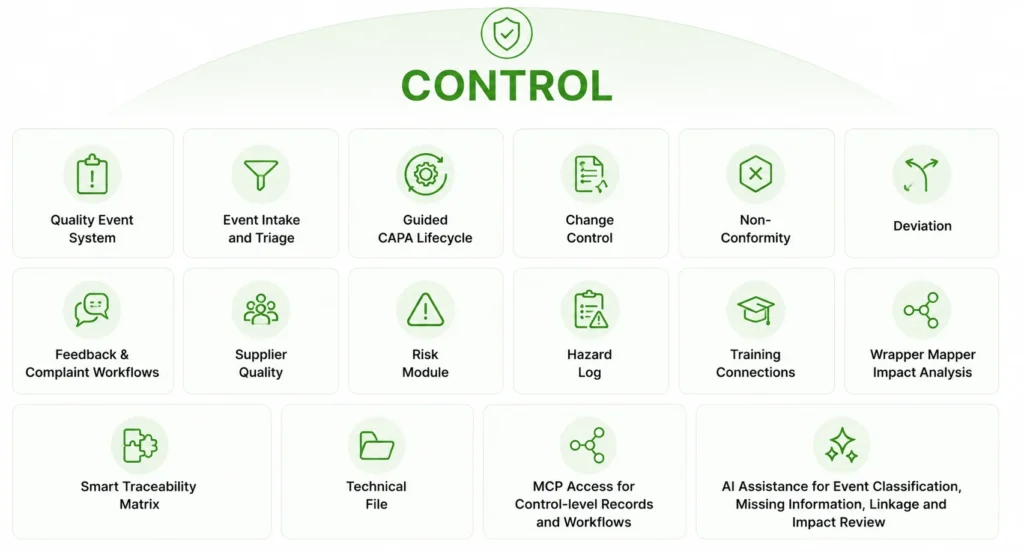
Control includes advanced capabilities such as:
- Quality Event System
- Event intake and triage
- guided CAPA lifecycle
- Change Control
- Non-Conformity
- Deviation
- Feedback and complaint-related workflows
- Supplier Quality
- Risk Module
- Hazard Log
- Training connections
- Wrapper Mapper impact analysis
- Smart Traceability Matrix
- Technical File
- MCP access for Lifecycle-level records and workflows
- AI assistance for event classification, missing information, linkage and impact review
QES: capturing the quality events that usually get missed
Many quality problems do not begin as formal CAPAs.
They begin as small events.
A customer comment.
A supplier issue.
A training gap.
A process deviation.
A complaint-like signal.
A change that seems minor until the impact is understood.
In many companies, these events are lost in emails, chat messages, spreadsheets, meeting notes or informal conversations.
qmsWrapper Lifecycle is designed to end that.
The Quality Event System gives users a controlled front door for quality events.
Events can be captured, classified and reviewed before they disappear into daily work. AI can help propose whether an event may relate to Change, Non-Conformity, Deviation, Feedback, CAPA, Training, Supplier activity, Risk or other QMS processes.
The QMS Manager remains in control.
AI proposes.
The QMS Manager reviews.
The system preserves the record.
The evidence stays connected.
Guided CAPA lifecycle
In Foundation, CAPA can be captured in the CAPA Log.
In Control, CAPA becomes a connected lifecycle.
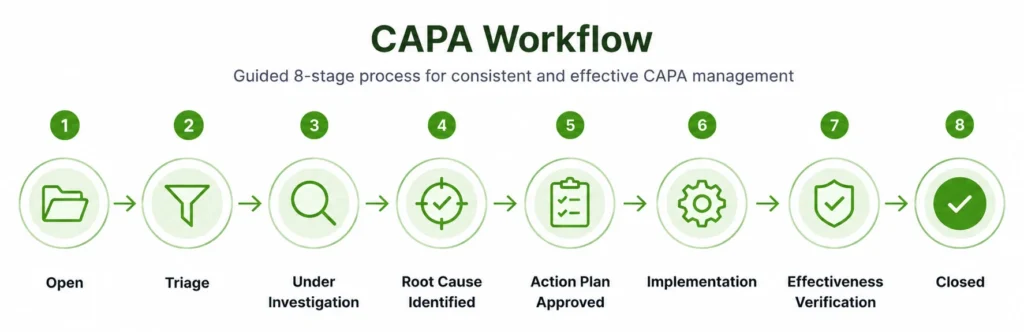
qmsWrapper 10.3 introduces a guided eight-stage CAPA workflow designed to help quality teams perform CAPAs consistently:
- Open
- Triage
- Under Investigation
- Root Cause Identified
- Action Plan Approved
- Implementation
- Effectiveness Verification
- Closed
The guided CAPA lifecycle supports:
- significance assessment
- investigation
- root cause analysis
- corrective and preventive action planning
- implementation tracking
- effectiveness verification
- management review where required
- controlled closure
- quality gates
- separation of duties
- document protection while CAPAs remain open
- AI-assisted suggestions during investigations
CAPA is no longer merely a form to complete.
It becomes a controlled process with gates, responsibilities, evidence and closure discipline.
Wrapper Mapper: understanding impact before evidence breaks
One of the hardest parts of regulated quality is not recording that something changed.
It is understanding what the change affects.
A quality event may impact a workflow, SOP, form, training requirement, supplier record, risk control, hazard, requirement, traceability link, Technical File section, PMS activity or regulatory evidence.
Wrapper Mapper helps identify those relationships.
In qmsWrapper Lifecycle, Wrapper Mapper supports impact analysis across connected system elements, including:
- workflows
- forms
- SOPs
- QMS Manual sections
- training requirements
- CAPA records
- change records
- risk records
- Hazard Log
- Traceability Matrix
- Technical File
- supplier controls
- PMS and audit evidence pathways
This is where qmsWrapper moves beyond forms and logs.
It helps teams understand what quality activity affects, what needs review and where the evidence should connect.
Smart Traceability Matrix and Technical File
Control introduces deeper Traceability Matrix and Technical File capability.
The Smart Traceability Matrix helps connect requirements, risks, design outputs, verification, validation, evidence and related QMS activity.
The Technical File capability helps organize and maintain structured regulatory evidence for medical-device readiness.
Together with Wrapper Mapper, these capabilities help teams understand whether a quality event, change, CAPA, risk update or training issue may affect the evidence used to support compliance.
The goal is simple:
Do not wait until audit or submission preparation to discover that the evidence trail is broken.
qmsWrapper Vigilance
Coming later this summer from Beta
qmsWrapper Vigilance is planned for release later this summer as it comes out of Beta.
Vigilance extends qmsWrapper beyond operational QMS control into post-market, regulatory, audit and management oversight.
It is designed for companies whose evidence burden has grown beyond day-to-day QMS activity.
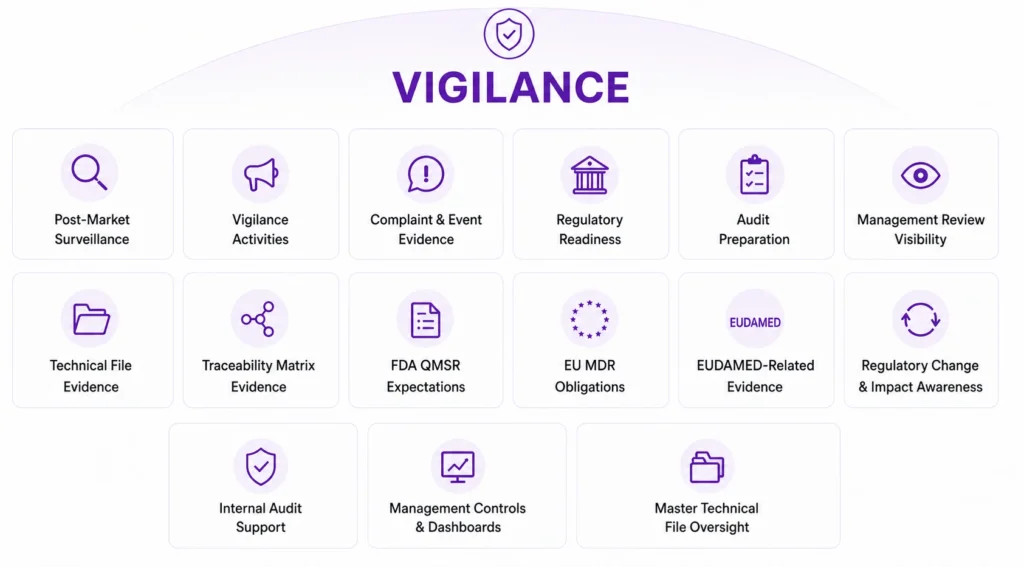
Vigilance is intended to support visibility across:
- post-market surveillance
- vigilance activities
- complaint and event evidence
- regulatory readiness
- audit preparation
- management review visibility
- Technical File evidence
- Traceability Matrix evidence
- FDA QMSR expectations
- EU MDR obligations
- EUDAMED-related evidence
- regulatory change and impact awareness
- internal audit support
- management controls and dashboards
- Master Technical File oversight
Vigilance is where QMS activity becomes broader regulatory evidence oversight.
It helps organizations move from reacting to quality events toward continuously monitoring whether emerging risks, trends, regulatory obligations or evidence gaps require attention.
Platform-wide improvements in 10.3
Release 10.3 also includes significant improvements across the qmsWrapper platform.
These improvements are designed to make daily quality work faster, clearer and easier to manage while preserving the control, accountability and traceability required in regulated environments.
Document Control
Document Control now includes a more visible and controlled document lifecycle.
Documents can move through defined states such as Draft, Pending Approval, Approved, Effective, Expired or Superseded. Effective dates are handled more clearly, including automatic promotion to Effective when a future effective date arrives.
Other improvements include:
- visible document lifecycle badges
- stronger revision management
- effective date controls
- revision history protection
- custom starting version for migrated documents
- live updates across open pages
- separate viewing and download permissions
- improved folder movement and storage controls
A document is not just a file. It is a controlled record with a lifecycle.
Release 10.3 makes that lifecycle easier to see, manage and trust.
Reviews and approvals
Reviews and approvals are faster and more visible in 10.3.
Improvements include:
- Pending Reviews tab
- Waiting for me / Sent by me / History views
- live refresh as colleagues act
- bulk approve, decline and cancel
- PIN-based electronic signatures
- effective date capture during approval
- unified Send for Approval flow
- review email notifications
These changes reduce administrative friction while strengthening accountability.
Tasks and projects
Task management has been improved with new ways to view and manage work.
Release 10.3 introduces:
- Board view
- Date Board view
- overdue visibility
- task peek drawer
- improved task tables
- better action menus
- deletion confirmation
- date validation
- clearer close-blocker messages
- improved related-task visibility
Quality work depends on follow-through. These improvements make it easier to see what needs attention and act without losing context.
Process Editor
The Process Editor has been refreshed with usability, export and reliability improvements.
Enhancements include:
- improved light theme
- SVG vector export
- improved trigger creation
- better decision-branch handling
- richer trigger conditions
- clearer step types on the canvas
- improved layout stability
- export and usability refinements
This strengthens one of the most important Foundation capabilities: the ability to turn forms and processes into controlled workflows.
Risk, Traceability Matrix and Technical File improvements
Release 10.3 also includes improvements across risk, traceability and technical documentation, including:
- risk revision lock
- per-group risk approval settings
- automatic verification tasks after mitigation closure
- risk status notifications
- linked-risk tooltips
- Traceability Matrix gap detection
- improved ordering of AI-suggested test columns
- Technical File document previews
- Technical File document actions
- Wrapper Mapper Analysis naming and integration
These improvements support the Lifecycle-level direction of qmsWrapper: connecting QMS activity to impact, risk and evidence.
Multi-organization sign-in
Users working across multiple organizations can now sign in once, select an organization and switch between organizations from the sidebar without re-entering their password.
This is especially useful for consultants, groups, suppliers and users supporting multiple companies.
Additional usability improvements
Release 10.3 includes many additional refinements across dashboards, forms, chat, notifications, tags, storage, reports and navigation.
Individually, many of these changes are small.
Together, they make qmsWrapper faster, clearer and more usable for daily quality work.
AI as strategy, not decoration
Release 10.3 includes major AI capabilities, but this is not an AI-first release.
It is a QMS implementation release.
AI matters because it helps the QMS operate more intelligently.
In Foundation, AI helps import, identify, retrieve and structure records across documents, tasks, training and storage.
In Control, AI helps classify events, identify missing information, support CAPA investigation, suggest related records and support impact review.
In Vigilance, AI will help map evidence, regulatory obligations, PMS, Technical File, Traceability Matrix, audit readiness and regulatory change.
AI is not a separate chatbot sitting beside the QMS.
It is load-bearing.
It works inside the system, within permissions, with audit trail, attribution and human approval.
Approved AI assistants can use controlled MCP access where enabled. Personal Access Tokens allow access to be scoped and revoked without password sharing. AI-supported actions remain attributable and traceable.
Every AI suggestion remains reviewable.
Every approval remains human.
Every controlled record remains under the QMS.
In regulated quality, AI should not replace quality professionals.
It should help them find the right record, understand the right impact, prepare the right evidence and make better controlled decisions.
The direction of qmsWrapper
qmsWrapper 10.3 marks a major step in the evolution of the platform.
It introduces a practical implementation path for medical-device SMEs:
Foundation when the immediate need is to control documents, forms, processes, tasks, projects, training, CAPA visibility and the QMS Manual.
Lifecycle when the organization needs connected quality workflows, QES, guided CAPA lifecycle, change control, risk, hazard management, Wrapper Mapper, Smart Traceability Matrix and Technical File control.
Vigilance when post-market, audit, management and regulatory evidence obligations require broader oversight.
Start where the need is greatest.
Keep what you build.
Expand when ready.
Ready to see qmsWrapper 10.3?
Book a personalized demonstration and see how Foundation, Lifecycle and Vigilance can support your current stage of QMS readiness and provide a clear path for future growth.
Whether you are building your first controlled QMS or expanding an existing system, qmsWrapper helps you move from paper QMS to connected regulatory evidence.
qmsWrapper 10.3 Questions Answered: Foundation, Lifecycle & Vigilance
What is qmsWrapper 10.3?
qmsWrapper 10.3 is a major platform release introducing three connected QMS levels—Foundation, Lifecycle and Vigilance. The platform allows medical device companies to implement a Quality Management System progressively while keeping all documents, records, workflows and evidence connected as they grow.
What are the three qmsWrapper levels?
The platform consists of three connected implementation levels:
- Foundation — controlled documents, forms, workflows, projects, training, CAPA Log, QMS Manual and AI-assisted QMS foundations.
- Lifecycle — connected quality workflows including the Quality Event System (QES), guided CAPA lifecycle, Change Control, Risk Management, Wrapper Mapper, Smart Traceability Matrix and Technical File.
- Vigilance — post-market surveillance, regulatory evidence oversight, audit readiness, management visibility and continuous compliance monitoring.
Each level builds on the previous one without replacing existing work.
Who should use qmsWrapper Foundation?
Foundation is designed for medical-device startups and growing companies that want to replace paper documents, Word files, Excel spreadsheets and shared folders with controlled records, document management, workflows, training and audit-ready evidence.
What is included in qmsWrapper Lifecycle?
Control extends Foundation by connecting quality activities into regulated workflows. It includes the Quality Event System (QES), guided CAPA lifecycle, Change Control, Risk Management, Supplier Quality, Smart Traceability Matrix, Technical File, Wrapper Mapper and AI-assisted quality investigations.
What is qmsWrapper Vigilance?
Vigilance is the third platform level, planned for release later this summer after Beta. It focuses on post-market surveillance, vigilance, audit preparation, management oversight, FDA QMSR readiness, EU MDR evidence and broader regulatory visibility.
What is the Quality Event System (QES)?
The Quality Event System (QES) captures quality events before they are lost in emails, meetings or spreadsheets. It allows organizations to record, classify, review and connect events such as deviations, complaints, non-conformities, supplier issues and change requests to the appropriate regulated workflows.
How does the guided CAPA workflow work?
The guided CAPA lifecycle follows eight controlled stages:
- Open
- Triage
- Under Investigation
- Root Cause Identified
- Action Plan Approved
- Implementation
- Effectiveness Verification
- Closed
Each stage includes quality gates, evidence, approvals and AI-assisted support while keeping final decisions under human control.
What is Wrapper Mapper?
Wrapper Mapper is qmsWrapper’s impact analysis capability. It helps identify which documents, SOPs, risks, training records, workflows, Technical File sections, Traceability Matrix entries and regulatory evidence may be affected by a proposed change before compliance gaps occur.
Does qmsWrapper include AI?
Yes. AI is integrated throughout the platform rather than added as a separate chatbot. It assists with document creation, record retrieval, event classification, impact analysis, training support, CAPA investigations and evidence discovery while maintaining permissions, audit trails and human approval.
What is MCP access in qmsWrapper?
qmsWrapper supports controlled Model Context Protocol (MCP) connectivity through scoped Personal Access Tokens. Approved AI assistants can securely access permitted QMS information—such as Storage, Tasks, Training and Lifecycle-level records—without sharing user passwords.
Can AI approve or change quality records automatically?
No. AI assists with searching, drafting, identifying relationships and suggesting actions, but controlled records always remain under human review, approval and electronic signature. Every AI-assisted activity is attributable and traceable.
Is qmsWrapper suitable for ISO 13485 and FDA QMSR?
Yes. qmsWrapper is designed for regulated medical-device organizations and supports implementation aligned with ISO 13485, FDA QMSR, EU MDR and related regulatory frameworks through connected records, workflows, traceability and controlled evidence.
Can startups begin with Foundation and upgrade later?
Yes. The platform is designed for progressive implementation. Companies can start with Foundation and later expand to Lifecycle and Vigilance without migrating data or rebuilding their Quality Management System.
What happens to existing qmsWrapper customers?
Current customers are automatically grandfathered into the Lifecycle level for the remainder of their current subscription period. At renewal, they can choose the platform level that best matches their organization’s QMS maturity and regulatory needs.
Why is the three-level platform different from traditional eQMS software?
Traditional eQMS platforms often require organizations to implement a full enterprise-quality system from the beginning. qmsWrapper allows companies to start with the level they need today while preserving every document, workflow, record and evidence link as the organization grows, eliminating costly migrations and disconnected systems.